
Equipment Responsibility Policy

Please read and sign below.
Care, use, and accountability for devices and tools used for LOJO work
Purpose
As a remote-first company, LOJO's work happens on computers, phones, and home office setups distributed around the world. This policy sets the standards for how equipment used for LOJO work is maintained, secured, and returned. It covers both Company-provided equipment and personal equipment used to perform LOJO work, and it applies to all team members.
Company-Provided Equipment
Equipment issued by the Company, including computers, monitors, phones, and accessories, remains the property of LOJO Group, LLC at all times.
Tech Ops maintains an equipment register recording what was issued, to whom, and when. Team members must confirm receipt of issued equipment in writing.
Use issued equipment for LOJO work. Limited personal use is permitted if it does not interfere with work, violate any Company policy, or introduce security risk.
Take reasonable care of issued equipment: follow operating instructions, keep it clean and protected, do not leave it unattended in public or in a vehicle, and do not allow others, including family members, to use it.
Do not modify, repair, or install unapproved software on issued equipment without Tech Ops approval.
Report loss, theft, or damage to the Manager of Support & Tech Ops immediately. A stolen or lost device is a security incident, not just a hardware problem, because of the accounts it can reach.
To the extent permitted by law, team members may be required to repay the Company for equipment lost or damaged through negligence or unauthorized use.
Personal Equipment Used for Work
Many LOJO team members work on their own computers. Using a personal device for LOJO work is a privilege that carries the same security obligations as Company equipment:
The device must meet minimum standards: a supported operating system receiving automatic security updates, full-disk encryption enabled, a login password or biometric, auto-lock set to 10 minutes or less, and reputable anti-malware protection where applicable.
A reliable high-speed internet connection and a working camera and microphone suitable for client video calls are required. Eligible team members receive a monthly internet reimbursement under the Team Member Benefits Program.
LOJO work data lives in Company systems, not on the device. Do not download client data, exports, or Company files to local storage except temporarily for an active task, and delete local copies when the task is complete.
Do not perform LOJO work on shared or public computers.
If a personal device used for work is lost, stolen, or compromised, report it to the Manager of Support & Tech Ops immediately so credentials and sessions can be rotated.
Upon separation, the team member must permanently delete all Company and client data, files, and credentials from personal devices and confirm the deletion in writing.
Software, Licenses, and Accounts
Use only licensed, Company-approved software and subscriptions for LOJO work. Tech Ops manages license purchases and renewals.
Unauthorized duplication of copyrighted software is prohibited.
Work accounts, including email, ClickUp, GrowthGenie360, and platform seats, are Company property and may be accessed, suspended, or reassigned by the Company at any time.
Return of Equipment on Separation
Upon separation for any reason, all Company property must be returned promptly, including devices, accessories, credentials, recovery codes, and any Confidential Information in any form. Tech Ops will coordinate return shipping for physical equipment where applicable and will verify the equipment register is cleared. Final settlement of any amounts owed for unreturned or damaged property will be handled to the extent permitted by law.
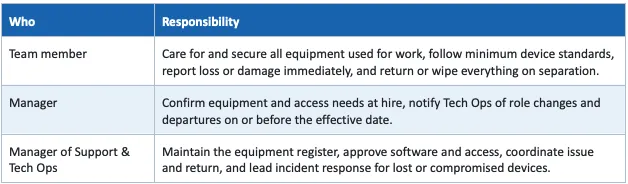
Responsibility Summary
Acknowledgement